How to Plan a Home Office That Inspires Productivity (For Owner-Builders)
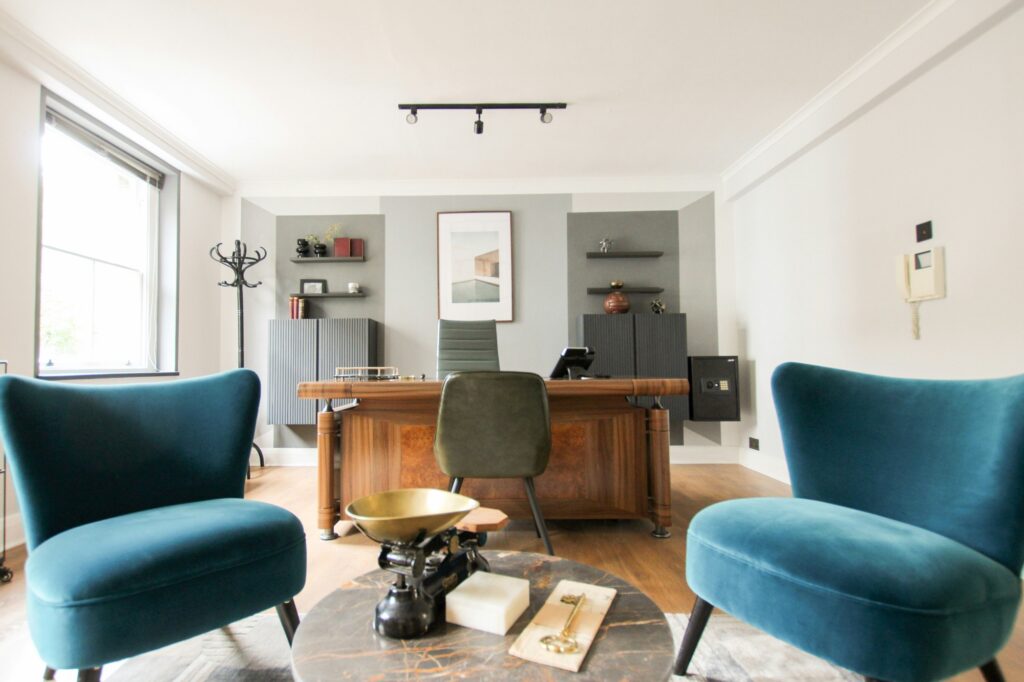
Designing a home office while you’re building your own house is the ultimate chance to create a workspace that actively fuels your focus, creativity, and well-being. You’re not retrofitting a spare bedroom; you’re shaping structure, siting, wiring, acoustics, daylight, HVAC, and millwork from the ground up so the room works as hard as you do. The payoff is huge: fewer distractions, faster deep work, healthier posture, cleaner video calls, and a space that “disappears” when you’re off the clock. This guide walks through a builder-grade approach—how to choose the right location, engineer silence and comfort, plan power and data like a small office, and sequence the build so your office installs smoothly alongside the rest of the home.
Start With a Clear Brief (Who You Are, What You Do, What the Room Must Do)
Before you draw a rectangle on the floor plan, write a one-page brief that captures how you truly work. Are you on video calls for three hours a day or mostly in heads-down writing/design? Do you need spreading space for physical documents, prototyping gear, or dual workstations for a partner? Do you meet clients on site and need a private entrance? The clearer your brief, the tighter your layout, wiring, and acoustics will be. Many owner-builders skip this step, then over-spec a flashy desk and under-spec the air sealing and sound isolation that actually control focus.
Translate that brief into measurable requirements. Define the primary task zones (focus desk, collaboration/whiteboard wall, standing sketch counter, acoustic call pod), the storage types you need (flat files, vertical binders, instrument cases), and the tech stack (PC/Mac tower, NAS, PoE cameras, dedicated printer). Then decide the mood you want: quiet library, bright studio, or executive den. Your brief becomes the decision filter for every choice that follows—if a feature doesn’t serve the brief, it’s a distraction.
Choose the Right Location and Orientation (Where Productivity Starts)
Siting the office is half the victory. For deep work, acoustic separation beats adjacency to the kitchen every time. If your plan allows, place the office on the quiet side of the house away from kid zones, laundry, and media rooms. In two-story layouts, offices on upper floors shed footfall noise from above; on slabs, offices near garages may pick up door rumbles and exhaust unless sealed and ventilated well. Think vertically too: avoid putting your office beneath a bathroom or laundry if you can—drain stacks are surprisingly chatty.
Orientation affects daylighting and glare. Northern light is soft and consistent, ideal for screen work; eastern light gifts bright mornings; western exposures invite afternoon heat and glare you’ll fight with shading and HVAC. If you love view glass, plan exterior shading and interior glare control so your monitors remain legible at noon in July. A modest overhang, light shelves, or adjustable exterior shading can turn a harsh exposure into luminous, low-glare illumination.
Size, Proportions, and Layout That Actually Work
A productive office isn’t necessarily huge; it’s proportional and organized. For a single workstation with storage, 10′×12′ is a sweet spot; for dual workstations, 12′×14′ or larger keeps aisles generous. If you include a small meeting area, design at least one 7–8′ clear wall for a whiteboard or pin-up zone and one 5–6′ clear run behind the chair for movement and visitors. Avoid deep, narrow “bowling alley” proportions that force your desk into corners and funnel sound.
Place the desk so the camera faces a calm backdrop and ambient light hits from the side. Keep glare sources (bare windows, mirror-finish art) out of your sightline and camera frame. Anchor a secondary surface—standing shelf, credenza, or return—for layout and rapid switching between tasks. If you co-work with a partner, angle desks or use a low divider with independent task lights so one person’s focus doesn’t become the other’s distraction.
Engineer Silence: Acoustic Isolation From the Studs Out
Silence is designed, not purchased. If you’re still at framing, step up to acoustic assemblies that make the room a refuge. A simple and highly effective stack is double-layer 5/8″ drywall with damping compound on resilient channel over mineral wool in the stud bays. For even better isolation, use staggered-stud or double-stud walls between the office and noisy spaces, and run solid-core doors in acoustically sealed jambs with drop seals. Your future self on a high-stakes call will thank you.
Don’t forget flanking paths. Sound sneaks through ductwork, shared floor cavities, and back-to-back electrical boxes. Use putty pads on boxes, offset boxes on opposite sides of walls, and run ducted returns rather than transfer grilles. If you must place a return in the office, oversize and baffle it to slow air and hush flow noise. For floors, carpet tile with cushion underlayment or a thicker engineered wood plus an area rug will tame footfalls and room slap.
Daylight and Electric Lighting: Layered, Glare-Free, Camera-Ready
Great work light is about layers. Start with diffuse ambient light from the ceiling: can-free low-profile fixtures or linear slots that wash the room evenly. Add task lighting at the desk—an adjustable arm lamp with high CRI (90+) at 3000–3500K keeps documents crisp and skin tones natural. Build accent lighting into shelving or a wall wash behind the camera for depth; your video calls will look studio-clean with minimal effort.
Control matters more than wattage. Put each layer on dimmers and consider a tunable-white desk lamp that warms in the evening to cue wind-down. For screens, avoid downlights directly overhead that create under-eye shadows on camera. If your office has skylights, specify diffusers and plan blackout shades for presentations. Good lighting reduces eye strain, improves mood, and makes you look competent on camera without filters.
Thermal Comfort and Air Quality: Quiet HVAC, Crisp Air
Cognitive performance follows comfort and CO₂ levels. If you’re building new, give the office a dedicated supply and return on the HVAC design or, better, a separately zoned system with quiet variable speed. For detached or over-garage offices, a ducted or ductless heat pump keeps noise down and control precise. Aim for a low-sone air handler and isolate it from the office walls with vibration breaks.
Fresh air beats afternoon brain fog. Integrate an ERV/HRV into the house system with balanced flows to the office, and monitor CO₂ so you know when to boost ventilation. If you use a lot of markers or solvents, add a small exhaust near the work surface. Finally, manage solar gain with exterior shading and high-performance glazing so your HVAC doesn’t chase the sun all day.
Power and Data: Wire It Like a Small Studio
Productivity dies on the altar of bad wiring. During rough-in, pull more circuits and conduits than you think you need. A strong baseline is two 20A dedicated circuits for receptacles, one 15–20A circuit for lighting, and a dedicated line for any heavy gear (large printer, server, or amplifier). Use surge protection at the panel and a UPS at the workstation to guard your sessions from blips.
For data, treat Wi-Fi as a convenience, not a backbone. Run at least two Cat6A home runs to the office—one for a wired connection to your router/switch and one spare for PoE devices (camera, phone, access point). If the office will host a NAS or mini-server, pre-wire Cat6A/Cat7 plus a small sub-panel or dedicated circuit in the closet. Drop conduit from the attic and from the crawl/basement to a media panel for future tech; empty conduit is the cheapest future-proofing in construction.
Built-Ins and Storage: Millwork That Eliminates Visual Noise
Clutter destroys focus. As the owner-builder, you control the millwork—use it. Design a full-height storage wall with a mix of closed cabinets for visual calm and a few open shelves for books or display. Reserve deep drawers for cables, peripherals, and camera gear, and vertical slots for sketch pads, tablets, and laptops. An appliance garage for chargers and hubs keeps surfaces clean, and grommets with brush inserts route cables invisibly.
If you shoot video or record audio, incorporate acoustic shelves and fabric-wrapped panels into the built-ins. These double as décor and absorption. A whiteboard niche with integrated task lights turns a wall into a productivity engine; a pin-up rail or cork strip above the desk captures in-progress ideas without visual sprawl. Get your cabinet maker involved early so the wall outlets, switches, and low-voltage boxes land exactly where the millwork wants them.
Furniture and Ergonomics: Fit the Room to the Body
Your chair, desk height, monitor distance, and keyboard angle determine whether you arrive energized or wrecked. Choose an adjustable chair with lumbar support and set the desk at ~29″ for most, adding a sit-stand option if your work benefits. Mount monitors so the top bezel is at or slightly below eye level and the distance is an arm’s length, with dual monitors angled to avoid neck strain.
Keep frequent-use items within the “golden zone” from mid-thigh to mid-chest. Use a keyboard tray if you need negative tilt, and choose a large desk mat to stabilize mouse and keyboard. Place a standing counter for quick ideation and pacing calls if that fits your style; a narrow 12–16″ deep ledge along a window with a view can be the perfect quick-task spot that resets your brain.
Camera-Ready Backgrounds and On-Screen Presence
Since you’re designing from scratch, give your camera something intentional to see. A neutral, textured backdrop—bookcase, slatted wood, or a calm paint with a matte finish—beats a blank wall. Add a soft accent light behind you for depth and keep distracting reflections out of frame. If you use a green screen, give yourself even front lighting and space to stand away from the screen to avoid spill.
Plan mounting points for a webcam or mirrorless camera, a ring or key light, and cable paths that don’t mob the desk. If you go with a teleprompter or camera shelf behind the monitor, coordinate monitor depth and VESA mounts now so the ensemble fits without tipping the desk into a room hog.
Doors, Access, and Boundaries: Protect the Focus Zone
A productive office has behavioral boundaries baked in. Use a solid-core door with quiet latches and add a discreet “recording” or “on call” light outside tied to your calendar or a wall switch. If you host clients, consider an exterior door or a short secondary entry from the porch to keep the household private. Inside the home, locate the office off a quieter hall, not a main living corridor. Boundaries help your family respect work time—and help you leave the office mentally when the door closes.
Code, Permits, and Taxes: Plan the Boring Stuff Smartly
Even a home office must meet electrical, egress, and ventilation codes. Plan outlet spacing, smoke/CO detectors as required by your jurisdiction, and any tempered glass requirements if windows drop low. If you’re in the U.S. and expect to claim the home office deduction, note the exclusive and regular use rules and talk to a CPA before you decide on a separate entrance or convert part of a garage or ADU—design choices can affect how the IRS views your space. This isn’t legal advice; it’s a nudge to align design with compliance from day one.
Future-Proofing: Design for Change Without Tearing Walls
Work evolves. Add conduit stubs, extra back boxes, and blanked junctions where you might later hang a TV, add a second workstation, or install acoustic baffles. Oversize the data panel and leave pull strings in conduit runs. Use a modular desk system and movable acoustic screens so you can re-zone the room without drywall dust. And keep a map of the office wiring in your project binder; owner-builders become their own facilities managers after move-in.
Budget: Where to Spend, Where to Save
Put money where your brain lives: acoustics, chair, lighting, and HVAC control. You can save with semi-custom millwork instead of fully custom, engineered wood instead of exotic species, and open shelves used sparingly. Lighting doesn’t have to be designer; spec-grade fixtures with the right optics outperform many boutique options at half the cost. Spend on solid doors, mineral wool, resilient channel, and ice-quiet HVAC—these never go out of style.
A simple allocation for a serious home office might look like: Acoustics 15–20%, Millwork 20–30%, Lighting & Controls 10–15%, Furniture/Ergonomics 15–20%, Power/Data/UPS 10–15%, Finishes 5–10%, Contingency 10%. If you need to trim, reduce decorative finishes before you touch acoustic or HVAC performance.
Construction Sequencing: Build It Once, Build It Right
Sequence saves money. After framing, run MEP rough-ins with acoustics in mind: stagger boxes, pull extra Cat6A, and route ducts thoughtfully. Install mineral wool and seal penetrations; then apply resilient channel and the first drywall layer. Add damping compound and the second layer, then tape and texture. Next come ceilings and lighting, then millwork blocking before drywall if needed. After paint, install built-ins, flooring, doors and seals, and finally device plates, network gear, and desk power feeds. Don’t schedule countertop template until built-ins are set and plumb; don’t hang monitors or cameras until lighting is tested and dialed.
Common Owner-Builder Mistakes (And Easy Fixes)
The most common failure is treating the office like any other bedroom, then trying to fix it with gadgets. Fix: design acoustic assemblies and wiring during rough-in. Another is underestimating glare. Fix: test monitor positions against actual sun paths and budget layered shading. Many owners overspend on décor and underspend on the chair and lights. Fix: allocate funds for ergonomics first; the best paint can’t undo a bad posture and dim desk.
A final trap is over-complicating the floor plan with too many doors, glass walls, or built-ins that block future flexibility. Fix: keep one strong storage wall, one flex wall, and clear, quiet door placement. The most productive offices feel calm because the bones do the hard work.
Room-By-Room Integration With the Rest of the Build
If you’re adding a studio or maker’s zone nearby, isolate it acoustically and give it separate exhaust so fumes or tool noise never reach your office. If the office backs onto a nursery or bedroom, spring for double-stud or staggered-stud there too; your sleep and focus cycles will be happier. If the office shares a wall with a bath, insulate both the stud bays and the plumbing wall, and specify quiet fans with timers to keep vent noise out of your recordings.
Quick Planning Checklist (Pin This to Your Project Binder)
- Define work patterns, call frequency, and storage needs in a one-page brief
- Pick a quiet location with favorable orientation; avoid noise stacks above/below
- Specify acoustic assemblies (mineral wool, resilient channel, double 5/8″, solid door)
- Design lighting layers (ambient/task/accent) with dimming and glare control
- Provide dedicated circuits, surge/UPS, and Cat6A home runs with spare conduit
- Integrate HVAC zoning or quiet heat pump; ensure fresh air and CO₂ control
- Draw millwork elevations with cable management and device locations coordinated
- Choose ergonomic furniture; plan camera backdrop and mounting points
- Include exterior shading and interior blackout/glare shades as needed
- Sequence construction to protect acoustic assemblies and align trades
- Document everything—as-builts, wiring map, equipment list—for future changes
FAQs (Fast, Practical Answers)
Is a dedicated office worth the square footage in a self-build?
Yes—if you engineer silence, comfort, and wiring. Those three unlock more productivity than any décor upgrade and are cheapest to do during new construction.
What’s the single highest-impact upgrade?
For most knowledge workers: acoustic isolation and high-CRI task lighting. You’ll think clearer, sound better, and feel less fatigued.
Do I really need wired internet if my Wi-Fi is fast?
For calls, uploads, and big syncs, wired beats wireless for stability and latency. Run Cat6A while the walls are open.
How big should my office be?
Enough for your task zones and clear movement. Many thrive in 10′×12′ with smart storage; large isn’t better if acoustics and lighting are poor.
Best floor finish?
For quiet and comfort: carpet tile with cushion or a warm engineered wood plus rugs. Hard tile looks sharp but reflects sound and chills feet.
The Bottom Line
A home office that truly inspires productivity isn’t an aesthetic—it’s a system. When you’re building your own house, you control every layer: the location that deflects household noise, the acoustic shell that keeps calls crisp, the lighting that flatters faces and fuels focus, the HVAC that keeps your brain sharp, and the power/data backbone that never drops a meeting. Add millwork that hides clutter, ergonomics that protect your body, and a camera-ready backdrop that looks professional without effort, and you’ll ship better work with less stress.
Design it now, at the studs and circuits stage, and your office will feel inevitable—quiet when you need it, bright when you want it, and invisible when you’re done for the day. That’s the owner-builder advantage: you don’t adapt to a room; the room is built to amplify you.